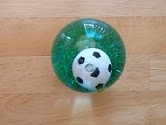
 * * | Rubber Ball with moving soccer ball and glitter inside. This ball responds to movement similar to an old-style snow globe and easily fits into one’s hand. This ball would make a great fidget toy for a student - such as one diagnosed with ADHD - who could benefit with an item that assists with self-regulation. It also can assist with focus and attention to task, calming, and active listening. Additionally it would not break easily and it would be quiet if dropped. |
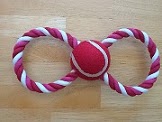 * * | Tug Toy for a Dog. This study rope double looped item has its intended use for a game of tug with one’s dog, however, this 9” item with a tennis ball inside would be beneficial for an OCD (obsessive compulsive disorder) student who has an aversion to touching other people’s hands but needs to be led by another person. As this item is very stiff and doesn’t lose its shape, it would be easy to grasp one end of the loop. |
 * * | Stretch Cord with Carabiners. This multi-purpose “bungee” cord with attached carabiners at either end can serve so many useful purposes for students with exceptionalities with motor skills. It can be used to secure items such as books to an extension table for example, for students who are diagnosed with Spastic Diplegia (Paraplegia) Cerebral Palsy - the most common form of CP. This item could also be useful for attaching items at one end, such as a key, and securing the other end to a person or wheelchair for example. Since the cord stretches, it would allow for movement while staying with the intended person or object. |
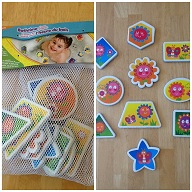 * * | Bathtime Foam Shapes These lightweight foam shaped pieces are waterproof, small hand-sized, and colourful with high interest pictures. One possible use for the pieces is to assist a visually impaired student. The ability to ‘feel the shape’ of the pieces would assist in learning shapes like star, circle, square etc., as they could feel the shape and add tactile sensory information in addition to auditory. |
 | Create Your Own Photo Magnets This item is basically one magnet sheet with a peel and stick surface. It can have a paper picture attached and then can be cut to any shape. This item would be great for an ASD student who depends on visual cues for prompting and assistance. The ability to be moved from one magnetic surface to another makes this item flexible and portable. |
Wednesday, 13 June 2012
Low Tech - Low Cost dollar store items
After the morning demonstration of low-tech items for AT applications, the class took the afternoon to shop for similiar items that could be useful for classrooom (potentially home as well) applications. The Dollar store had many great items to choose from - 5 such items are below:

Saturday, 9 June 2012
June 9
Morning Activities
· Using my hook
There were very good examples for social
stories for a variety of situations in a school or in the community. As mentioned in the last post, the stories were easy to create and I enjoyed watching the other 'books' created by class groups. I especially liked the book on personal space - I find that this can be an issue with students as I have witnessed students who didn't know this aspect of interacting with others. As a child becomes older, this is especially important as inappropriate behaviors by peers can be initiated by invasion into their personal space.
http://ableplay.org/ was a website that was explored this morning as well. It actually is a non-profit charity that highlights appropriate AT for persons with exceptionalities. Ratings and opinions and an evaluation of an item are a feature of this site. The seach button enables a person to search according to a specific disability category. A list of toys is shown that could provide assistance for the disability.
The morning started out with several
presentations of group stories from the Book Creator app:
·
Raise your hand
·
Personal space
·
Waiting my turn at the water fountain· Using my hook
Especially intriguing was the demonstration of low cost items that could be purchased at a dollar store and used for 'low tech' AT applications. These items were not modified in any way and were ready to go after purchase.
Some examples were:
- Plastic salad tongs which could be used to help pick things up for those with grasping difficulties.
- Egg carton which separates items in its sections which also help develop a pincher grasp.
- Foam curler that could assist as a pencil grip for those who need extra assistance with grip
- Car wash brush which is soft to the touch and could be used for assisting a student with spacial orientation, such as an ASD student.
- Story book with stiff cardboard type pages suitable for a child but with the modification of placing and gluing 'toe-separators' to the backs of every page and 'fanning open'so that the page could be much more easily opened thus de-emphasizing fine motor skills and enabling those with these motor challenges to have access to reading a book by themselves.
- Paper cup with adaptation which was my favorite item. I could not figure out what the missing piece in the cup was for until demonstrated. The item was for someone who could not fully tilt their head back to drink liquid contents so the missing 'half moon' portion on one side of the cup was for the cup to tilt to make full contact with the fact - in effect, a noise opening.
- 4 inch ring binder that, when placed on its side became an excellent slant board for those individuals who need materials placed on an angle. With the addition of grippy shelf style foam (which I have used in the past for camper cupboards with dishes), the binder will not slip from its location.
Saturday, 2 June 2012
June 2nd
Great demonstration this morning of the usage of Apple TV and airplay - students can take over the presentation of the app from their desk which is beneficial for students who don't like to come up to the front of the classroom to speak or use a whiteboard.
Some of the interactive apps for classroom applications that I really liked:
Frogdisection - shows the stages of egg, tadpole to full grown frog. Shows and describes internal organs in 360 degress for example. Pretty amazing. Human vs frog comparison table.
Many books are being digitized by book publishers now so that learning can occur digitally rather and be more interactive.
BareFootWorld Atlas - spinning globe. Can go around the world and many different applications - not just geography but can be used for other subjects, politics for example.
Back in Time - time line of evolution - a very beautiful presentation with this app. Beautiful videos.I just LOVED this app. I would have spent hours and hours with this as a kid.
BritannicaKids - $1.99 per each subject with speech selection. Say goodbye to Encyclopedia book sales which cannot be updated as with this type of product.
Simplephysics - interactive activities: ladder to tree example. Great for physics teachers, parents and students alike.
Essential hardware adaptors for expanded iPad usage:
 Apple brand VGA to iPad connector enables the iPad to be able to connect to the classroom projector.

Generic brand adaptor for iPad for other applications.
BuyNCell
www.buyncell.ca
During the morning portion, we viewed webinars related to apps for various applications and student needs.
Our group task was to view an assigned webinar. Our group looked at the "Top free apps in Special Education". This webinar featured 30 apps - there were so many apps to choose from for our presentation of 3 apps. We finally narrowed it down to:
Science360 - a free app by the American Science Foundation for the iPad only that features beautiful and informative science and engineering videos and pictures. This is delivered in streaming video or still picture format. This app allows sharing to twitter, Facebook or email. Great for visual learners and all students to engage for interest and learning activities.
Pocket Pond - another free app that is very beautiful as it shows a koi pond that is very interactive; touch the water and it makes a water sound, add more fish, lillypads or dragonflies as you wish. Sounds like outdoors. A great app to calm and sooth, great for transitions with students who need a break in routine and good for controlling emotions. I am going to download this myself as it is so relaxing and everyperson can appreciate a mental break, not just special needs students.
TourWrist - 2012 people's choice award winner, MacWorld 2012 best of show winner. Panoramic views from around the world where anyone can upload videos. An amazing app.
Other groups presented on their selections:
1st group :Physical Access to mobile devices
WritePad: draw on iPad - converts handwriting to text
Touch trainer - trains student with fine motor issues to practice toucing the screen, reward is moving target which gets smaller, moves and music plays - the target selection and cause and effect
Dragon speaking free: speech to text program
2nd group: Executive Functions
Sock puppets: good for students who are afraid to make eye contact. Hears a sound and moves the mouth. Can record, good for speech delays.
Shredder: type word and pull negative thought by finger into the picture of a paper shredder. Frontal lobe - let go and move on.
LetPanicGo: no sound and need to read, no settings, scripted. Focuses thought on fallling leaves or a feather - "keep breathing and touch the screen in the box shown. Good for students with anxiety and OCD issues.
3rd group: Early Learners
Prior to usage for early learners, it is important to address the "Rules of engagement" - rules for using the iPad to prevent damage and encourage proper usage.
Kiddie questions: asks 5 Wh questions. Example: "What flies in the sky?" Click for answer, will speak the answer as well. Interaction with child or independent.
Bugs and Buttons: flying bees - many activities. Pinch and grap - pinch spiders and put into jar with sounds. Have to touch. Addresses lots of skills. Address finger strength and prewriting skills for holding a pencil. Reward, collect bugs to scrapbook. Engaging and inexpensive.
JibJab: import photo and put into person template. Example: student makes a pizza. Lots of fun for sure.
4th group: Communication Disorders
Sign4ME: Type in message and onscreen person signs message. Can move around all dimentions and perspectives, 11,500 words can be signed. $9.99 cost
Speech Tutor: Video modelling. Shows how to form letters by showing an upclose picture of a sideways or front facing face. Palette diagram shows where tongue hits mouth. Can record own pronouciation. Speaks pronounciation. Great app instead of using a mirror.
5th group: Math
Money Count CAD: can set time to count money. Screenshot shows are variety of coins that a student counts.Has issues since game needs to finish before can return to the main screen. Can't move coins either. Can scale to number of coins.
Symmetry Shuffle: slide, flip or turn a picture (a cup for example). Counts time or number of moves - can be challenging and fun.
Number Line: positive and negative
Barb as well highlighted a couple more math apps:
math dictionary - visually looks like cognitive credit cards - speaks as well
math glossary, math terms, Kahn academy
Second Group Task - afternoon
My parter Alana and I created a social story book based on the principles of video modelling to encourage positive behaviors and outcomes. We used an app, Book creator, which produces a print based story that allows text, picures and sound to be entered. This app is great for ASD students as it can be very personalized. It was extremely easy to use the interface in this app to create a book. Aditionally, I can see this app being useful not only for students with exceptionalities but with all students to create personalized books on any topic. This book can then be 'published' to the iBooks app in the iPad (iPhone/iPod) where it can be viewed as a book, like any other purchased or created book that is placed in the app.
Book creator app. $ 4.99

As the new owner of an iPad since March of this year, and as an owner of an iPhone since 2008, I am enjoying the various apps that are available on the iPad 2. I actually purchased this Book Creator app about a month ago but didn't get around to using it to create any type of book. After this exercise on Saturday, I thought I would try the app and create my own social story.
Some of the interactive apps for classroom applications that I really liked:
Frogdisection - shows the stages of egg, tadpole to full grown frog. Shows and describes internal organs in 360 degress for example. Pretty amazing. Human vs frog comparison table.
Many books are being digitized by book publishers now so that learning can occur digitally rather and be more interactive.
BareFootWorld Atlas - spinning globe. Can go around the world and many different applications - not just geography but can be used for other subjects, politics for example.
Back in Time - time line of evolution - a very beautiful presentation with this app. Beautiful videos.I just LOVED this app. I would have spent hours and hours with this as a kid.
BritannicaKids - $1.99 per each subject with speech selection. Say goodbye to Encyclopedia book sales which cannot be updated as with this type of product.
Simplephysics - interactive activities: ladder to tree example. Great for physics teachers, parents and students alike.
Essential hardware adaptors for expanded iPad usage:
 Apple brand VGA to iPad connector enables the iPad to be able to connect to the classroom projector.
Generic brand adaptor for iPad for other applications.
BuyNCell
www.buyncell.ca
During the morning portion, we viewed webinars related to apps for various applications and student needs.
Our group task was to view an assigned webinar. Our group looked at the "Top free apps in Special Education". This webinar featured 30 apps - there were so many apps to choose from for our presentation of 3 apps. We finally narrowed it down to:
Science360 - a free app by the American Science Foundation for the iPad only that features beautiful and informative science and engineering videos and pictures. This is delivered in streaming video or still picture format. This app allows sharing to twitter, Facebook or email. Great for visual learners and all students to engage for interest and learning activities.
Pocket Pond - another free app that is very beautiful as it shows a koi pond that is very interactive; touch the water and it makes a water sound, add more fish, lillypads or dragonflies as you wish. Sounds like outdoors. A great app to calm and sooth, great for transitions with students who need a break in routine and good for controlling emotions. I am going to download this myself as it is so relaxing and everyperson can appreciate a mental break, not just special needs students.
TourWrist - 2012 people's choice award winner, MacWorld 2012 best of show winner. Panoramic views from around the world where anyone can upload videos. An amazing app.
Other groups presented on their selections:
1st group :Physical Access to mobile devices
WritePad: draw on iPad - converts handwriting to text
Touch trainer - trains student with fine motor issues to practice toucing the screen, reward is moving target which gets smaller, moves and music plays - the target selection and cause and effect
Dragon speaking free: speech to text program
2nd group: Executive Functions
Sock puppets: good for students who are afraid to make eye contact. Hears a sound and moves the mouth. Can record, good for speech delays.
Shredder: type word and pull negative thought by finger into the picture of a paper shredder. Frontal lobe - let go and move on.
LetPanicGo: no sound and need to read, no settings, scripted. Focuses thought on fallling leaves or a feather - "keep breathing and touch the screen in the box shown. Good for students with anxiety and OCD issues.
3rd group: Early Learners
Prior to usage for early learners, it is important to address the "Rules of engagement" - rules for using the iPad to prevent damage and encourage proper usage.
Kiddie questions: asks 5 Wh questions. Example: "What flies in the sky?" Click for answer, will speak the answer as well. Interaction with child or independent.
Bugs and Buttons: flying bees - many activities. Pinch and grap - pinch spiders and put into jar with sounds. Have to touch. Addresses lots of skills. Address finger strength and prewriting skills for holding a pencil. Reward, collect bugs to scrapbook. Engaging and inexpensive.
JibJab: import photo and put into person template. Example: student makes a pizza. Lots of fun for sure.
4th group: Communication Disorders
Sign4ME: Type in message and onscreen person signs message. Can move around all dimentions and perspectives, 11,500 words can be signed. $9.99 cost
Speech Tutor: Video modelling. Shows how to form letters by showing an upclose picture of a sideways or front facing face. Palette diagram shows where tongue hits mouth. Can record own pronouciation. Speaks pronounciation. Great app instead of using a mirror.
5th group: Math
Money Count CAD: can set time to count money. Screenshot shows are variety of coins that a student counts.Has issues since game needs to finish before can return to the main screen. Can't move coins either. Can scale to number of coins.
Symmetry Shuffle: slide, flip or turn a picture (a cup for example). Counts time or number of moves - can be challenging and fun.
Number Line: positive and negative
Barb as well highlighted a couple more math apps:
math dictionary - visually looks like cognitive credit cards - speaks as well
math glossary, math terms, Kahn academy
Second Group Task - afternoon
My parter Alana and I created a social story book based on the principles of video modelling to encourage positive behaviors and outcomes. We used an app, Book creator, which produces a print based story that allows text, picures and sound to be entered. This app is great for ASD students as it can be very personalized. It was extremely easy to use the interface in this app to create a book. Aditionally, I can see this app being useful not only for students with exceptionalities but with all students to create personalized books on any topic. This book can then be 'published' to the iBooks app in the iPad (iPhone/iPod) where it can be viewed as a book, like any other purchased or created book that is placed in the app.
Book creator app. $ 4.99
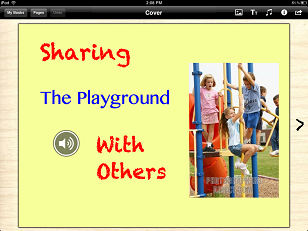
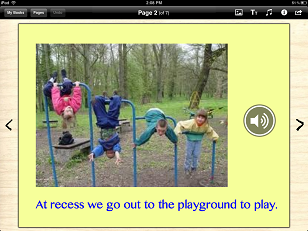
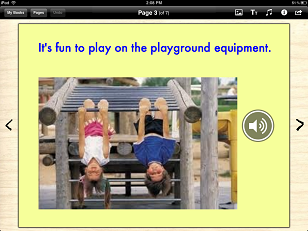
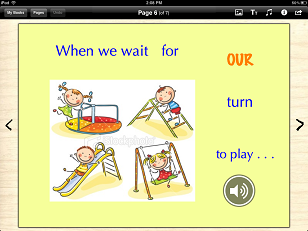
Since social stories can be used to assist with the understanding of a specific social situation and provide a positive example to replace a problem or unappropriate behavior with an appropriate one, I chose to create a social story for a student who is perhaps impulsive, OCD or ASD. This student is having problems waiting her/his turn on the playground at recess time which is having a negative impact on fellow classmates. Sharing the Playground with Others is the name of the book.
The link for the presentation: https://docs.google.com/presentation/d/1kGEjdfh8glTyTFfKinyH7y-BYMBhCBpMHKe5DWwvaDM/edit
Below is the book in the Book Creator app before it is put into iBooks. The top toolbar is shown however in iBooks the top bar will not be event.There is a sound icon on each page where the text is read out loud when touched on the iPad.
 * * |  * * |
 * * |  * * |
 * * |  * * |
 * * |
Thursday, 31 May 2012
Augmentative and Alternative Communication – AAC apps
After spending
time in the iTunes store and reviewing the many apps that are available in the
Education category and other categories as well, I selected the following 5
apps below which can address Augmentative
and Alternative Communication needs
of persons who are non-verbal or need assistance with verbal communication.
 |
Speech Button
iPhone, iPod
& iPad
|
Free Version
and
Paid
$3.99
|
Designed by an SLP and school psychologist as an ACC AT
to assist those with speech difficulties and non-verbal persons. The free
version has 4 words that are spoken with the touch of an onscreen button -y es,
no, more please, all done - while the paid version has 25 words. Very simplified
compared to Proloquo2Go but can be used as a springboard to a more complex
picture/text to speech App.
|
 |
Discover MyVoice for iOS
iPhone, iPod
& iPad
& Android
|
$49.99
|
An ACC app that is for persons who are non-verbal and of
low cognitive ability. It is easy to set up, lets one record a voice or the
device can read the message and personal pictures can be added to comprise a
virtual picture board. Similiar to Proloquo2Go categories are added and the
device will say a phrase or the item’s name. This app is promoting itself as
being better than a paper picture board, and indeed it is. For the price, I
believe it is a very beneficial ACC app. tutorial for
app
|
 |
AAC Speech
Buddy
iPhone, iPod
& iPad
& Android
|
$39.99
|
This AAC app is designed to create customized,
personalized speech communication sets; can add own pictures or use one of 2000
built -in images, 12 text to speech voices or use one of 12 built-in voices.
Screen looks very similar to Proloquo2Go but again, the price is lower therefore
a good value for the price. web page for
SpeechBuddy
|
 |
Assistive Chat
iPhone, iPod
& iPad
|
$24.99
|
Assistive Chat is a predictive speech to voice typing
app. The typed letter opens up a list of words to choose from or the words
can be displayed prior to typing a keystroke.The typed sentences are then
remembered in a list so that when touched they are voiced out loud by a
selection of built-in voices. There are free software programs for the
computer, such as MyStudyBar that have predictive text to speech but this app
is portable on a device and a fairly good value for the cost. httpweb
page for Assistive Chat
|
 |
I Click I Talk
Compact
iPad
|
$ .99
|
A very inexpensive AAC app that was created by an SLP
and a computer scientist. The app comes with 70 images and preloaded audio files
with the ability to record one’s own voice and add personal pictures or use the
app’s ability to download free (1000) cartoon-like images. Text can be inserted
below any image with the ability to create a maximum of 4 categories and 8
images for each category. Certainly a great price for AT persons who are
non-verbal and need a visual portable layout on a device such as an
iPad.
|
Wednesday, 30 May 2012
Setting up the selection set for Proloque2Go – In Class group task
Our 2nd double class on Saturday, May 26th expanded on our introduction to Proloquo2Go from our last class. Programming and customization – the designing of a selection set – was our focus for an assigned case study which involved a grade 3 female student. In setting out with the iPad to perform this task, it became apparent to our group of 3 that there was much more thought required than initially expected as there were many considerations: the environment (milieu), cognitive and physical abilities and communication needs of the student. Collaboratively, we decided on 3 buttons (dynamic folders) for the 1st screen appearance: Me, Home and School. To reach this stage we sat down and mapped out – Inspiration style – what we wanted to cover for all 3 main categories. For example, under “Me” we focused on her everyday dealings with others and considered that “…she enjoys friends but has minimal opportunities to play with them because they don't know how to respond to the (previous) AAC”; therefore we spent some time thinking about what she wanted to say to her friends. However, in doing this, we realized that we didn’t have enough time to fully set up this aspect as there were so many thoughts, statements and questions she could potentially convey through the interface. We included a picture of her horse, for example, and a picture of a horse jumping which related to her love of horses that could potentially open up a conversation with her peers about their pets. With more time we could have programmed in questions that involved a give and take of information related to hobbies, likes and dislikes.

With the other buttons, Home and School, we thought about how ‘deep to branch out’ within each subcategory (sets) and decided our student had the cognitive abilities to handle several layers. We realized that, even after mapping out on paper our ideas in relation to what we thought she would need, there was the time constraint of actually doing it – setting the appearance, selecting symbols (pictures – built-in or added), searching for vocabulary – most of it accomplished by going in and out of edit mode: typing in text to make a sentence and associating it with a symbol for text to speech was a major focus of setting up the category. We visually selected 4 buttons per page but there were many other settings to choose from - one gigantic button to a grid of very small buttons. We found setting up Proloquo2Go is relatively easy once the basics are understood, but indeed time consuming. I can see how the initial set-up could be a challenge – time wise- for teachers, assistants, paraprofessionals, professionals in addition to parents and other significant people involved with a student or person who will use this AT. However, once the basics of setup is grasped, I found it to be user-friendly; for those first starting out with Proloquo2Go, they will find on the web many videos that show the setup of a Proloquo2Go and usage with nonverbal students and adults -the AssistiveWare web site has many downloadable files for a “how to” ease of set-up and usage.
http://download.assistiveware.com/proloquo2go/files/Proloquo2GoVisualQuickStart9PerPage.pdf
I believe that Proloquo2Go on the iPad or iTouch/iPhone is a great AT app for persons who are non-verbal. It provides a voice for communication that allows for positive interactions with others. It surpasses by leaps and bounds other older AT, such as the PEC (Picture exchange program) through its dynamic interface. Additionally, with this AT, I like the fact that real pictures with the camera can be added as well as any other pictures -from a file or the web. Additionally I like that there are several voices to choose from in the set-up. Proloquo2Go can be truly personalized.
A final thought on setting up Proloquo2Go is that, if I have the opportunity to work with this AT again, I would create a category (button) that would focus on building relationship skills with others and be more situation-specific. Hopefully I will have that opportunity in the near future.

With the other buttons, Home and School, we thought about how ‘deep to branch out’ within each subcategory (sets) and decided our student had the cognitive abilities to handle several layers. We realized that, even after mapping out on paper our ideas in relation to what we thought she would need, there was the time constraint of actually doing it – setting the appearance, selecting symbols (pictures – built-in or added), searching for vocabulary – most of it accomplished by going in and out of edit mode: typing in text to make a sentence and associating it with a symbol for text to speech was a major focus of setting up the category. We visually selected 4 buttons per page but there were many other settings to choose from - one gigantic button to a grid of very small buttons. We found setting up Proloquo2Go is relatively easy once the basics are understood, but indeed time consuming. I can see how the initial set-up could be a challenge – time wise- for teachers, assistants, paraprofessionals, professionals in addition to parents and other significant people involved with a student or person who will use this AT. However, once the basics of setup is grasped, I found it to be user-friendly; for those first starting out with Proloquo2Go, they will find on the web many videos that show the setup of a Proloquo2Go and usage with nonverbal students and adults -the AssistiveWare web site has many downloadable files for a “how to” ease of set-up and usage.
http://download.assistiveware.com/proloquo2go/files/Proloquo2GoVisualQuickStart9PerPage.pdf
I believe that Proloquo2Go on the iPad or iTouch/iPhone is a great AT app for persons who are non-verbal. It provides a voice for communication that allows for positive interactions with others. It surpasses by leaps and bounds other older AT, such as the PEC (Picture exchange program) through its dynamic interface. Additionally, with this AT, I like the fact that real pictures with the camera can be added as well as any other pictures -from a file or the web. Additionally I like that there are several voices to choose from in the set-up. Proloquo2Go can be truly personalized.
A final thought on setting up Proloquo2Go is that, if I have the opportunity to work with this AT again, I would create a category (button) that would focus on building relationship skills with others and be more situation-specific. Hopefully I will have that opportunity in the near future.
Saturday, 26 May 2012
Assistive App
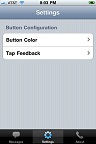
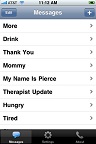
TS (Tap Speak)Button App
The Tap Speak button is a replacement for old AT that was
mechanical in nature. In the iTunes app store for $14.99 for the iPod/iPhone
and iPad, it is used for communication tasks. Reviews of this app indicate it
is a useful tool for communicating single messages. AutismEpicenter.com states that it is good for
ASD: “Great for the more severe population!”
 |
 |
 |
 |
 |
Saturday, 19 May 2012
Blog posting for class May 5
The first day of
class was very informative as it covered quite a bit of information involving
Assistive Technology and its practical use in the classroom and beyond. The
Past, Present and Future of AT Power Point demonstrated that the use of AT has been
growing and progressing in the classrooms of today’s schools. For example, in
the area of writing, there is a changing focus from the actual physical task of
writing to a focus on giving students an access to information. It is being realized by some educators that
the effort spent on reading remediation
for students with dysgraphia is better
spent on assistive technology tools and training. Yesterday’s paper, pencils
and graphic organizers have progressed to AT such as Kurzweil, PRISMO, scanning
software, and iPads. The straightforward definition below sums up the role of
AT for persons with a disability:
Assistive
Technology defined: providing access to a task and improving performance of an individual
with a disability.
The videos shown of students in the ppt. showed how AT
improved their access and performance. Of the students who were benefiting from
the use of AT, I was most affected by the cerebral palsy boy who was able to
join in with a music class through using his iPad and tongue to keep beat with
his classmates. When I was his age in school, he would not have been part of my
school; he would have been placed elsewhere in some sort of ‘handicapped
facility’ away from the general population. He would also be thought of as intellectually
inferior, probably in a major way. The iPad has given this boy a life he would
not have had otherwise. This Assistive Technology provides a great benefit to nonverbal
persons as it allows the nonverbal to demonstrate their intelligence – an intelligence
that would be overlooked or undervalued without such AT.
The future of AT
is exciting, especially when software is constantly being improved and written
for assistive devices such as the iPad. In class, I enjoyed using the iPad and
the apps that were installed on the device. In class we spent some time on the
app, Proloque2 Go which is a pretty
amazing app that is especially useful for nonverbal students such as some
autistic students. The company’s website describes this AT:
Proloquo2Go™ is an award-winning Augmentative and Alternative Communication (AAC) solution for iPad, iPhone and iPod touch for people who have difficulty speaking or cannot speak at all.
This app was very user friendly and we spent some time navigating the setup and functionality while composing ideas to communicate to another person. The exposure to this app certainly emphasizes that it’s a huge improvement over the older method of physically creating icons, images and pictures by hand and physically moving them around to communicate an idea.
The video from YouTube below shows Nick. His situation, as described on the AssistiveWare website, is as follows: Nick is ten years old and was diagnosed with autism. His progress in speech has been extremely slow. Picture symbols, picture exchange communication techniques and photos were tried but did not work out for him, as Nick was not really interested. When Nick started using an iPad, he immediately understood how it worked and really wanted to use it. The device was reinforcing and he sensed it was a powerful tool for him. Now that Nick is using an iPad with Proloquo2Go he no longer has to try to be what other people want him to be, because he can now initiate communication and say what he wants and needs. Nick lives in New Jersey, USA
The term AAC devices (Augmentative and Alternative Communication) was
used in class when describing the iPad and its AT qualities. This term was not
one that I was especially familiar with so I want to make note of it on this
blog. I like Wikipedia’s definition best which is: “AAC is an umbrella
term that encompasses the communication methods used to supplement or
replace speech or writing for those with impairments in the production or
comprehension of spoken or written language. AAC is used by those with a wide
range of speech and language impairments,
including congenital impairments such as cerebral
palsy, intellectual impairment and autism, and
acquired conditions such as amyotrophic lateral sclerosis and Parkinson's disease. AAC can be a permanent
addition to a person's communication or a temporary aid.”
I look forward in
the coming classes to learning more about AAC devices and other AT modifications.
Subscribe to:
Posts (Atom)